Manage multiple use cases with Codat
See how your organization can use Codat's solutions to implement multiple use cases
This guide is aimed at enterprise clients who use Codat's solutions for multiple use cases and covers the following:
- Configuration required to address multiple use cases
- APIAPI A set of rules and protocols that allows different software applications to communicate with each other. Codat provides APIs for accessing financial data from accounting, banking, and commerce platforms. requests for customers who share data for multiple use cases
- Features and specifics of Codat's solutions
Key terms and features
Products are feature packages representing a use case that can be enabled in the Codat Portal. Codat supports:
- Standard products that include data types defined by Codat as relevant and are available globally for all clients, such as Bank FeedsBank Feeds A Codat product that enables automatic synchronization of bank transaction data into a company's accounting software., Expenses, or Lending.
- Custom products that include data types requested by the client for a bespoke solution and are only available for use by that client.
You can apply either syncSync The process of fetching the latest data from a connected data source. Syncs can be triggered manually or run automatically on a schedule. settings that fit your use case best. Codat distinguishes either:
- Client-level syncSync The process of fetching the latest data from a connected data source. Syncs can be triggered manually or run automatically on a schedule. settings that are managed via Settings > Data Types in the Codat Portal, or
- Product-level syncSync The process of fetching the latest data from a connected data source. Syncs can be triggered manually or run automatically on a schedule. settings that are maintained by Codat upon client request.
To avoid the risk of dual syncsSync The process of fetching the latest data from a connected data source. Syncs can be triggered manually or run automatically on a schedule., you must only apply one type of syncSync The process of fetching the latest data from a connected data source. Syncs can be triggered manually or run automatically on a schedule. settings.
Products are represented by an additional products property on calls to the Create company endpoint and can be added to an existing companyCompany In Codat, a company represents your customer's business entity. Companies can have multiple connections to different data sources. using the Add product endpoint.
Codat's webhook service provides a range of event types for standard products. To be notified about data read events for custom products, use the {productIdentifier}.read.completed webhooksWebhook An automated notification sent from Codat to your application when specific events occur, such as when data syncs complete or connections change status..
Assign products to companies
The following guidance is suitable for enterprise clients who have implemented Codat with a central data ingestion layer.
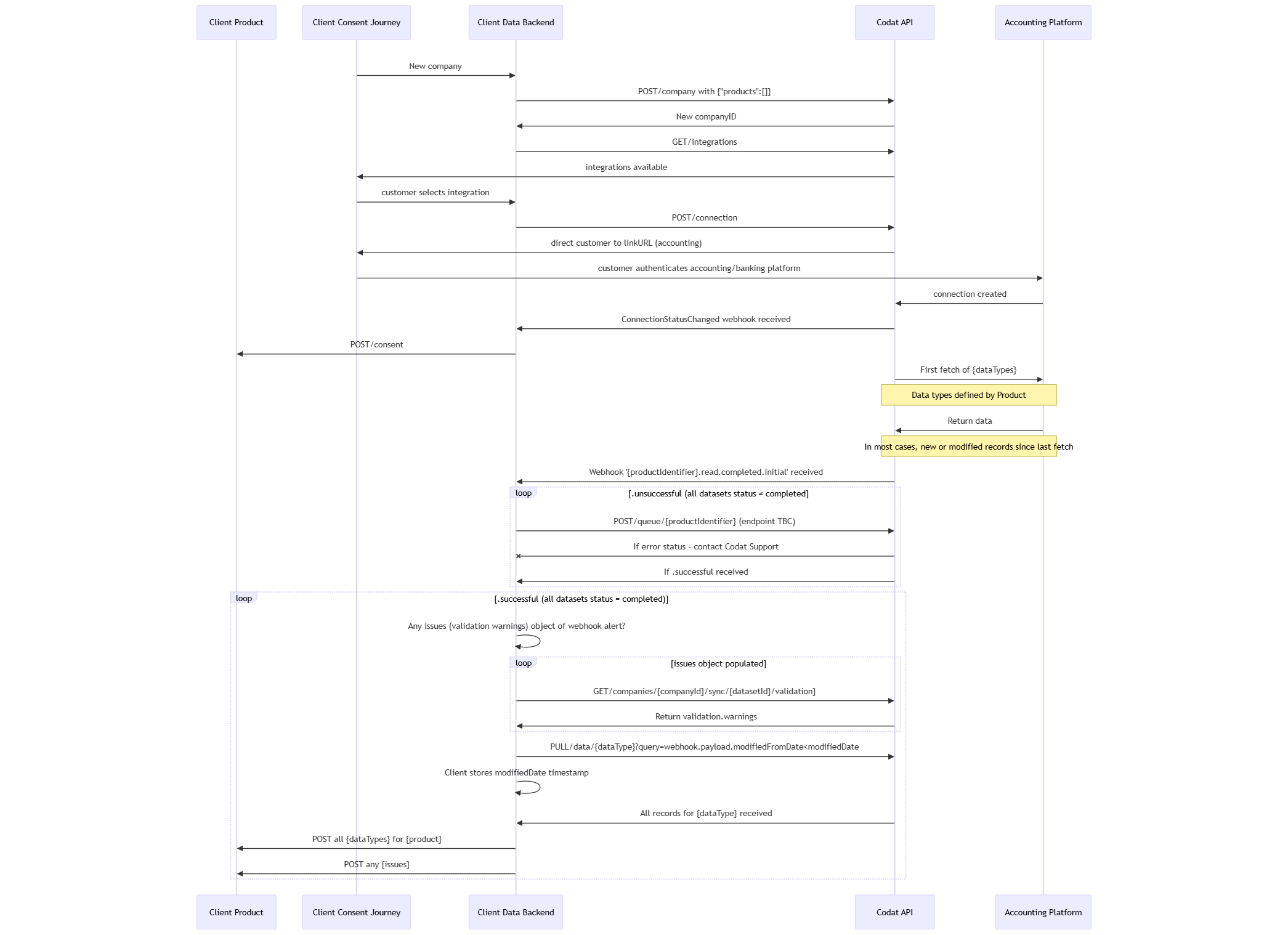
Create new companyCompany In Codat, a company represents your customer's business entity. Companies can have multiple connections to different data sources.
You can assign a product to a companyCompany In Codat, a company represents your customer's business entity. Companies can have multiple connections to different data sources. at the point of creating that companyCompany In Codat, a company represents your customer's business entity. Companies can have multiple connections to different data sources.. As a result, product-level syncSync The process of fetching the latest data from a connected data source. Syncs can be triggered manually or run automatically on a schedule. settings will apply to the first data fetch every time the companyCompany In Codat, a company represents your customer's business entity. Companies can have multiple connections to different data sources. gains a new connectionConnection A link between a Codat company and a data source (like an accounting platform). Each connection represents authorized access to pull or push data from that platform. in the Linked status.
Update existing companyCompany In Codat, a company represents your customer's business entity. Companies can have multiple connections to different data sources.
You can assign a product to an existing companyCompany In Codat, a company represents your customer's business entity. Companies can have multiple connections to different data sources. that already has a connectionConnection A link between a Codat company and a data source (like an accounting platform). Each connection represents authorized access to pull or push data from that platform. in the Linked status using the Add product endpoint. The product-level syncSync The process of fetching the latest data from a connected data source. Syncs can be triggered manually or run automatically on a schedule. settings will apply to the connectionConnection A link between a Codat company and a data source (like an accounting platform). Each connection represents authorized access to pull or push data from that platform. once the product is added.
This scenario assumes your customer has consented to the data type requirements of the additional use case.
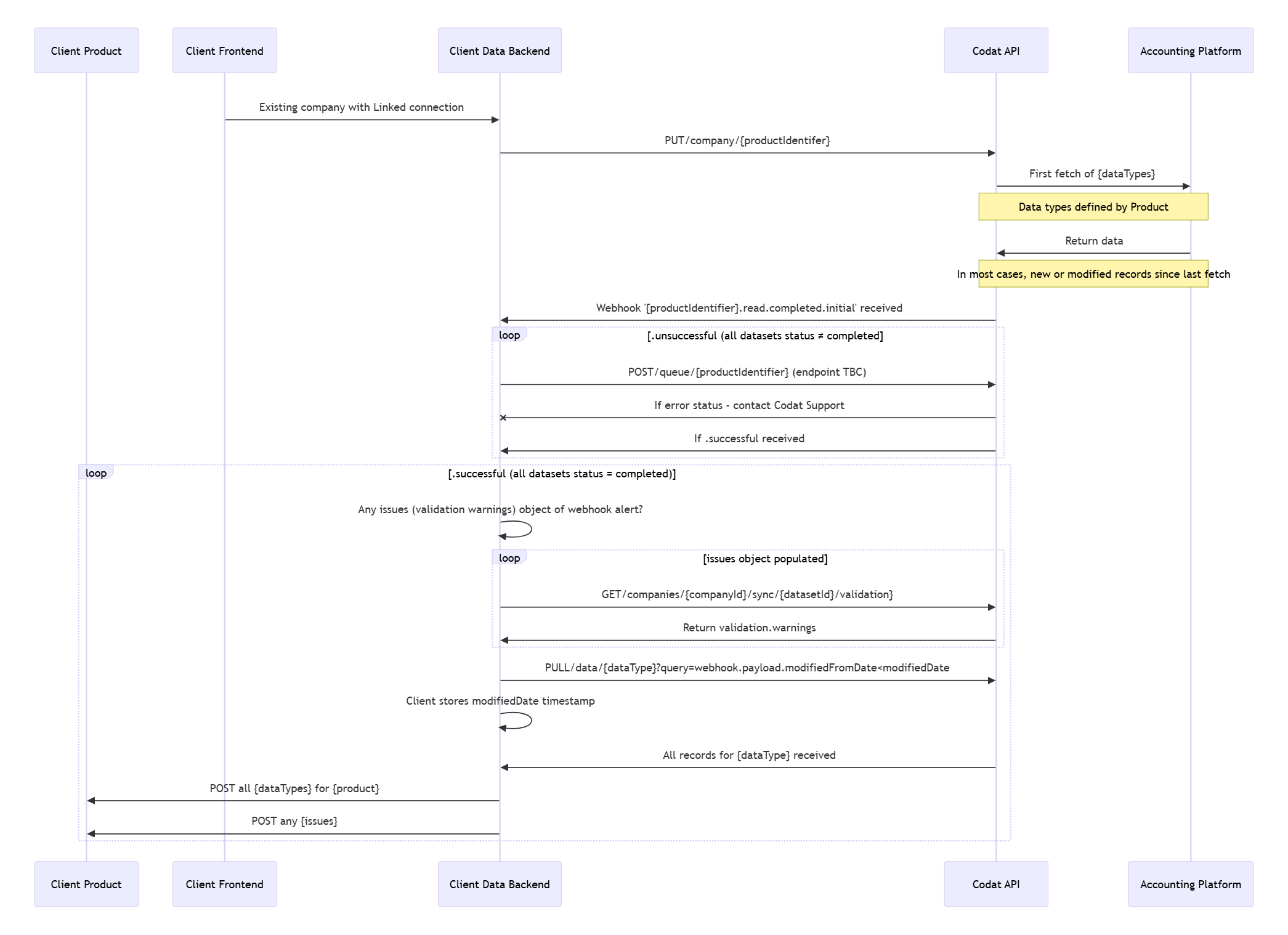
To remove a product from an existing companyCompany In Codat, a company represents your customer's business entity. Companies can have multiple connections to different data sources., use the Remove product endpoint.
Refresh data
Refresh in the Portal
The Refresh data button in the Codat Portal uses the client-level syncSync The process of fetching the latest data from a connected data source. Syncs can be triggered manually or run automatically on a schedule. settings defined in Settings > Data types when a data refresh is triggered. It doesn't use any product-level syncSync The process of fetching the latest data from a connected data source. Syncs can be triggered manually or run automatically on a schedule. settings that may have been maintained.
Refresh via APIAPI A set of rules and protocols that allows different software applications to communicate with each other. Codat provides APIs for accessing financial data from accounting, banking, and commerce platforms.
The methods listed below can't be used to refresh data for Codat's standard solutions. Refer to individual solutions' documentation instead.
If you are using client-level syncSync The process of fetching the latest data from a connected data source. Syncs can be triggered manually or run automatically on a schedule. settings, you can queue a data type refresh with these settings for a companyCompany In Codat, a company represents your customer's business entity. Companies can have multiple connections to different data sources. using the Refresh all data or Refresh data type endpoints.
If you are using product-level settings applied to custom products, you can refresh the data using the Refresh product data endpoint.
When refreshing data for a custom product, remember:
- If a data syncSync The process of fetching the latest data from a connected data source. Syncs can be triggered manually or run automatically on a schedule. is already in progress for a custom product, the refresh request will return a
Bad request (400)response. - If a companyCompany In Codat, a company represents your customer's business entity. Companies can have multiple connections to different data sources. has multiple custom products assigned, you have to refresh data for each product individually.
Manage data types in multiple products
Some data types may be required and used by multiple use cases and products. While the impact of this depends on your architecture, Codat supports product-level syncsSync The process of fetching the latest data from a connected data source. Syncs can be triggered manually or run automatically on a schedule. to reduce your need for additional caching or data storage.
If your organization employs several products that share a data type, teams using these products expect to see a complete set of data that covers the syncSync The process of fetching the latest data from a connected data source. Syncs can be triggered manually or run automatically on a schedule. period and frequency defined by that team. They don't want to be impacted by data syncsSync The process of fetching the latest data from a connected data source. Syncs can be triggered manually or run automatically on a schedule. triggered by a different team.
It may be that:
- Product A fetches invoices and payments once a day around 11 PM.
- Product B fetches payments every hour on the hour.
Codat ensures that, for product A, the recordsModifiedFrom date will align with its previously scheduled syncSync The process of fetching the latest data from a connected data source. Syncs can be triggered manually or run automatically on a schedule. and will capture all records modified after 11 PM the day before.
Custom product webhooksWebhook An automated notification sent from Codat to your application when specific events occur, such as when data syncs complete or connections change status.
Codat's webhookWebhook An automated notification sent from Codat to your application when specific events occur, such as when data syncs complete or connections change status. service supports custom {productIdentifier}.read.completed event types that will be sent to the configured endpoint when Codat has successfully fetched or exhausted fetching data.
As a result, unless you are using one of the sub-event types, such as .successful or .unsuccessful, you will see a Complete or Error status for all data types in that product.
A data type may end up in an Error state in the following scenario:
- Codat tries to perform a scheduled daily syncSync The process of fetching the latest data from a connected data source. Syncs can be triggered manually or run automatically on a schedule. defined by product-level syncSync The process of fetching the latest data from a connected data source. Syncs can be triggered manually or run automatically on a schedule. settings for a
LinkedconnectionConnection A link between a Codat company and a data source (like an accounting platform). Each connection represents authorized access to pull or push data from that platform.. - The linked accounting software is experiencing downtime.
- Codat receives an error response from the accounting software.
- Codat retries the data syncSync The process of fetching the latest data from a connected data source. Syncs can be triggered manually or run automatically on a schedule. up to 10 times over a 12-hour period and continues receiving error responses from the software.
- Codat flags the data set with a
FetchErrorstatus and sends aread.completedwebhookWebhook An automated notification sent from Codat to your application when specific events occur, such as when data syncs complete or connections change status..
Specific event types
You may choose to receive webhooksWebhook An automated notification sent from Codat to your application when specific events occur, such as when data syncs complete or connections change status. for more specific event types, such as successful or unsuccessful reads:
read.completed.successfulor{productIdentifer}.read.completed.successfulare sent of all data types have synced successfully. The synced data types may have validation warnings, but not validation errors.read.completed.unsuccessfulor{productIdentifer}.read.completed.unsuccessfulare sent if Codat has completed the fetch for all data types, but some have completed with errors.
The first webhookWebhook An automated notification sent from Codat to your application when specific events occur, such as when data syncs complete or connections change status. you receive after an initial successful companyCompany In Codat, a company represents your customer's business entity. Companies can have multiple connections to different data sources. connectionConnection A link between a Codat company and a data source (like an accounting platform). Each connection represents authorized access to pull or push data from that platform. (this could be a read.completed.successful.initial, read.completed.successful or read.completed event type) will present recordsModified as false. Next time you receive a notification from a read.completed event, such as after the next scheduled syncSync The process of fetching the latest data from a connected data source. Syncs can be triggered manually or run automatically on a schedule., you will see a true reflection of any record modifications since that first fetch of data.
Implementation considerations
The plan below reflects the activities required to migrate companyCompany In Codat, a company represents your customer's business entity. Companies can have multiple connections to different data sources. syncsSync The process of fetching the latest data from a connected data source. Syncs can be triggered manually or run automatically on a schedule. from using client-level syncSync The process of fetching the latest data from a connected data source. Syncs can be triggered manually or run automatically on a schedule. settings to product-specific syncSync The process of fetching the latest data from a connected data source. Syncs can be triggered manually or run automatically on a schedule. settings.
| # | Activity | Impact on webhooksWebhook An automated notification sent from Codat to your application when specific events occur, such as when data syncs complete or connections change status. | Impact on syncSync The process of fetching the latest data from a connected data source. Syncs can be triggered manually or run automatically on a schedule. | Rollback actions |
|---|---|---|---|---|
| 1 | Disable client-level syncSync The process of fetching the latest data from a connected data source. Syncs can be triggered manually or run automatically on a schedule. settings | No further syncsSync The process of fetching the latest data from a connected data source. Syncs can be triggered manually or run automatically on a schedule. scheduled except those already triggered | Re-enable client-level syncSync The process of fetching the latest data from a connected data source. Syncs can be triggered manually or run automatically on a schedule. settings | |
| 2 | Wait for an hour or for the duration of the most frequent previous syncSync The process of fetching the latest data from a connected data source. Syncs can be triggered manually or run automatically on a schedule. schedule | Allows any client-level syncsSync The process of fetching the latest data from a connected data source. Syncs can be triggered manually or run automatically on a schedule. already in progress to complete | Re-enable client-level syncSync The process of fetching the latest data from a connected data source. Syncs can be triggered manually or run automatically on a schedule. settings | |
| 3 | Disable previous webhookWebhook An automated notification sent from Codat to your application when specific events occur, such as when data syncs complete or connections change status. configuration | Event notifications will no longer be sent | 1. Resubscribe to previously disabled webhookWebhook An automated notification sent from Codat to your application when specific events occur, such as when data syncs complete or connections change status. events 2. Re-enable client-level syncSync The process of fetching the latest data from a connected data source. Syncs can be triggered manually or run automatically on a schedule. settings | |
| 4 | Configure webhooksWebhook An automated notification sent from Codat to your application when specific events occur, such as when data syncs complete or connections change status. for new event types | Standard products: subscribe to read.completed event types. Custom products: subscribe to {productIdentifier}.read.completed event types. | 1. Unsubscribe from the new event types 2.Resubscribe to previously disabled webhookWebhook An automated notification sent from Codat to your application when specific events occur, such as when data syncs complete or connections change status. event types 3. Re-enable client-level syncSync The process of fetching the latest data from a connected data source. Syncs can be triggered manually or run automatically on a schedule. settings | |
| 5 | Add products to all companies using the Add product endpoint | This will trigger a fetch of the product’s data types for the updated companies | 1. Remove product from the companyCompany In Codat, a company represents your customer's business entity. Companies can have multiple connections to different data sources. 2. Unsubscribe from the new event type series 3. Resubscribe to previously disabled webhookWebhook An automated notification sent from Codat to your application when specific events occur, such as when data syncs complete or connections change status. event types 4. Re-enable client-level syncSync The process of fetching the latest data from a connected data source. Syncs can be triggered manually or run automatically on a schedule. settings |
Additional considerations
When planning to implement multi-use case support, assess how this change may impact the following areas:
-
Environment management: do you have multiple development, testing, and staging environments?
-
Developer apps with partners: will you require more than one developer app for each accounting integration you support?
-
Consent journey: how will you ask your customers for additional consent in a transparent and compliant way?
For more information on implementing multi-use case support, get in touch with your Codat contact.