Manage connections and reconnect companies seamlessly with Link

You can now offer your customers a first-class connectionConnection A link between a Codat company and a data source (like an accounting platform). Each connection represents authorized access to pull or push data from that platform. management experience in LinkLink The authorization flow that allows end users to connect their accounting, banking, or commerce platforms to your application via Codat., making it easy for business users to view, disconnect, and reconnect their linked companies - and ensuring they reconnect the right one.
What's new?
Previously, when a companyCompany In Codat, a company represents your customer's business entity. Companies can have multiple connections to different data sources.'s connectionConnection A link between a Codat company and a data source (like an accounting platform). Each connection represents authorized access to pull or push data from that platform. was lost - through token expiry, a disconnect, or user action - there was no dedicated way to reconnect it. Users had to go through the standard LinkLink The authorization flow that allows end users to connect their accounting, banking, or commerce platforms to your application via Codat. flow again, with no guarantee they'd reconnect the same accounting file or legal entity they originally linked. Connecting a different entity by mistake meant broken data continuity and confused downstream reporting.
With the new manage connectionsConnection A link between a Codat company and a data source (like an accounting platform). Each connection represents authorized access to pull or push data from that platform. experience, business users can:
- See what they previously connected and relink it directly in LinkLink The authorization flow that allows end users to connect their accounting, banking, or commerce platforms to your application via Codat..
- Disconnect an existing connectionConnection A link between a Codat company and a data source (like an accounting platform). Each connection represents authorized access to pull or push data from that platform. when they need to revoke access.
- Reconnect with confidence - when a user authenticates with their accounting software, LinkLink The authorization flow that allows end users to connect their accounting, banking, or commerce platforms to your application via Codat. validates that the companyCompany In Codat, a company represents your customer's business entity. Companies can have multiple connections to different data sources. they're reconnecting matches the one originally connected.
- Catch mistakes before they happen - if the identities don't match, the user sees a clear warning that they're about to connect a different companyCompany In Codat, a company represents your customer's business entity. Companies can have multiple connections to different data sources., with the option to confirm or go back and select the correct one.
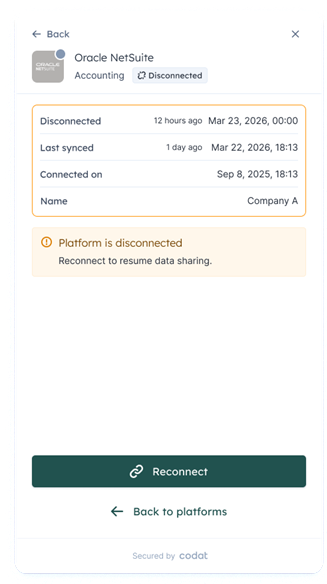
Reconnect a disconnected platform
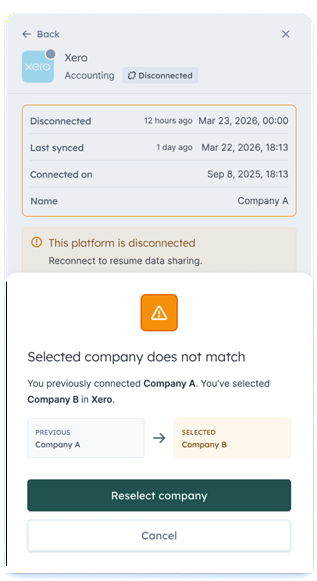
Mismatch warning when reconnecting
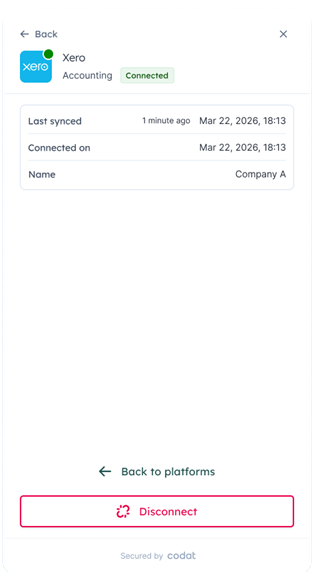
Option to disconnect a connected platform
The reconnection flow is available for all platforms. Validation against the previously connected companyCompany In Codat, a company represents your customer's business entity. Companies can have multiple connections to different data sources. is currently available for QuickBooks Online, Oracle NetSuite, and Sage Intacct.
Relinking is available in embedded LinkLink The authorization flow that allows end users to connect their accounting, banking, or commerce platforms to your application via Codat., and in Hosted Link for clients using secure linking with one-time passwords (OTPs) enabled.
Who is it relevant for?
Any client whose customers connect accounting platforms through LinkLink The authorization flow that allows end users to connect their accounting, banking, or commerce platforms to your application via Codat. - particularly banks and lenders that rely on continuous, uninterrupted data from the same companyCompany In Codat, a company represents your customer's business entity. Companies can have multiple connections to different data sources. for insights, monitoring, and credit decisioning.
How to get started?
The manage connectionsConnection A link between a Codat company and a data source (like an accounting platform). Each connection represents authorized access to pull or push data from that platform. experience is available in the LinkLink The authorization flow that allows end users to connect their accounting, banking, or commerce platforms to your application via Codat. SDK. To set it up:
-
Enable the Manage connectionsConnection A link between a Codat company and a data source (like an accounting platform). Each connection represents authorized access to pull or push data from that platform. setting in the Codat Portal under Settings > Auth flow > Link to let authenticated users view and manage their existing connectionsConnection A link between a Codat company and a data source (like an accounting platform). Each connection represents authorized access to pull or push data from that platform.. You can also customize the title and subtitle shown on the manage connectionsConnection A link between a Codat company and a data source (like an accounting platform). Each connection represents authorized access to pull or push data from that platform. screen.

-
Register your domain using the Set CORS settings endpoint so the component can make authenticated requests from your site.
-
Get a companyCompany In Codat, a company represents your customer's business entity. Companies can have multiple connections to different data sources. access token. Authenticated features require an access token, retrieved server-side from the Get company access token endpoint (
GET /companies/{companyId}/accessToken). Tokens are valid for 24 hours and scoped to a single companyCompany In Codat, a company represents your customer's business entity. Companies can have multiple connections to different data sources.. -
Pass the token to the LinkLink The authorization flow that allows end users to connect their accounting, banking, or commerce platforms to your application via Codat. SDK via the
accessTokenprop when initializing the component.
Using Hosted LinkLink The authorization flow that allows end users to connect their accounting, banking, or commerce platforms to your application via Codat.? Relinking is available there too when one-time passwords (OTPs) are enabled. We highly recommend setting this up - follow the instructions in our secure linking update.
Reach out to your account manager or our support team if you'd like help getting set up.