Introducing email notifications: stay informed about company events

You can now choose which email notifications your organization receives from the Codat Portal, and who receives them.
What's new?
A new Notifications page under Settings > Organization settings in the Codat Portal lets you manage three email notifications:
- CompanyCompany In Codat, a company represents your customer's business entity. Companies can have multiple connections to different data sources. connected: a companyCompany In Codat, a company represents your customer's business entity. Companies can have multiple connections to different data sources. connects a platform, or reconnects one that had been disconnected.
- CompanyCompany In Codat, a company represents your customer's business entity. Companies can have multiple connections to different data sources. disconnected: a companyCompany In Codat, a company represents your customer's business entity. Companies can have multiple connections to different data sources. unlinksLink The authorization flow that allows end users to connect their accounting, banking, or commerce platforms to your application via Codat. a connectionConnection A link between a Codat company and a data source (like an accounting platform). Each connection represents authorized access to pull or push data from that platform. or revokes access to their data. The email says which happened and linksLink The authorization flow that allows end users to connect their accounting, banking, or commerce platforms to your application via Codat. to the companyCompany In Codat, a company represents your customer's business entity. Companies can have multiple connections to different data sources. in the Portal so you can follow up.
- Spend Insights Report generated: a Spend Insights report is ready. The email includes the total spend and a linkLink The authorization flow that allows end users to connect their accounting, banking, or commerce platforms to your application via Codat. to download the report. Available only if report generation is enabled for your account.
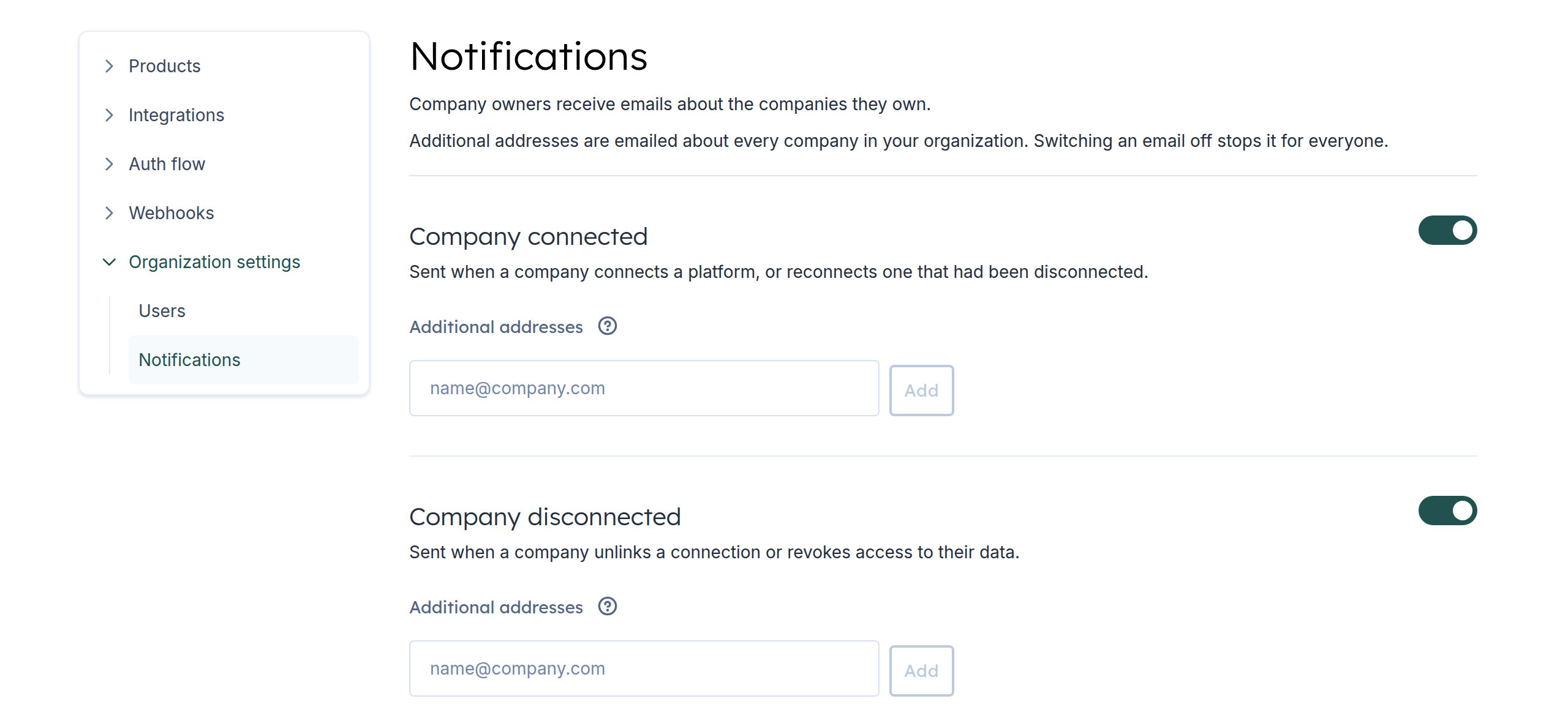
For each notification, you can:
- Switch it on or off. Switching it off stops it for everyone, including companyCompany In Codat, a company represents your customer's business entity. Companies can have multiple connections to different data sources. owners.
- Add additional addresses, such as a shared inbox. These receive emails about every companyCompany In Codat, a company represents your customer's business entity. Companies can have multiple connections to different data sources. in your organization, while company owners only receive emails about the companies they own.
Administrators can change these settings, and all other roles can view them. Changes are saved automatically.
Who is this relevant for?
All clients who use the Codat Portal, especially onboarding, support, and customer success teams who need to know when a companyCompany In Codat, a company represents your customer's business entity. Companies can have multiple connections to different data sources. connects or disconnects, and Spend Insights clients who want to know when a report is ready.
How to get started?
To turn on notifications for your organization, contact your account manager or our support team.
The three notifications in this release are enabled by default. If a company has an owner, they'll get an email as soon as an event happens. If you don't use companyCompany In Codat, a company represents your customer's business entity. Companies can have multiple connections to different data sources. owners, you can either assign owners or add an additional address on the Notifications page to receive notifications for all companyCompany In Codat, a company represents your customer's business entity. Companies can have multiple connections to different data sources. events.
We'll add more notification events over time. Stay tuned.