Updated Shopify Link flow

We've updated the Shopify LinkLink The authorization flow that allows end users to connect their accounting, banking, or commerce platforms to your application via Codat. flow so merchants connect using client ID and client secret instead of an Admin APIAPI A set of rules and protocols that allows different software applications to communicate with each other. Codat provides APIs for accessing financial data from accounting, banking, and commerce platforms. access token, with clearer in-flow guidance and step-by-step instructions that match Shopify’s latest custom app and distribution flow. This change is due to the deprecation of the original approach by Shopify.
What's new?
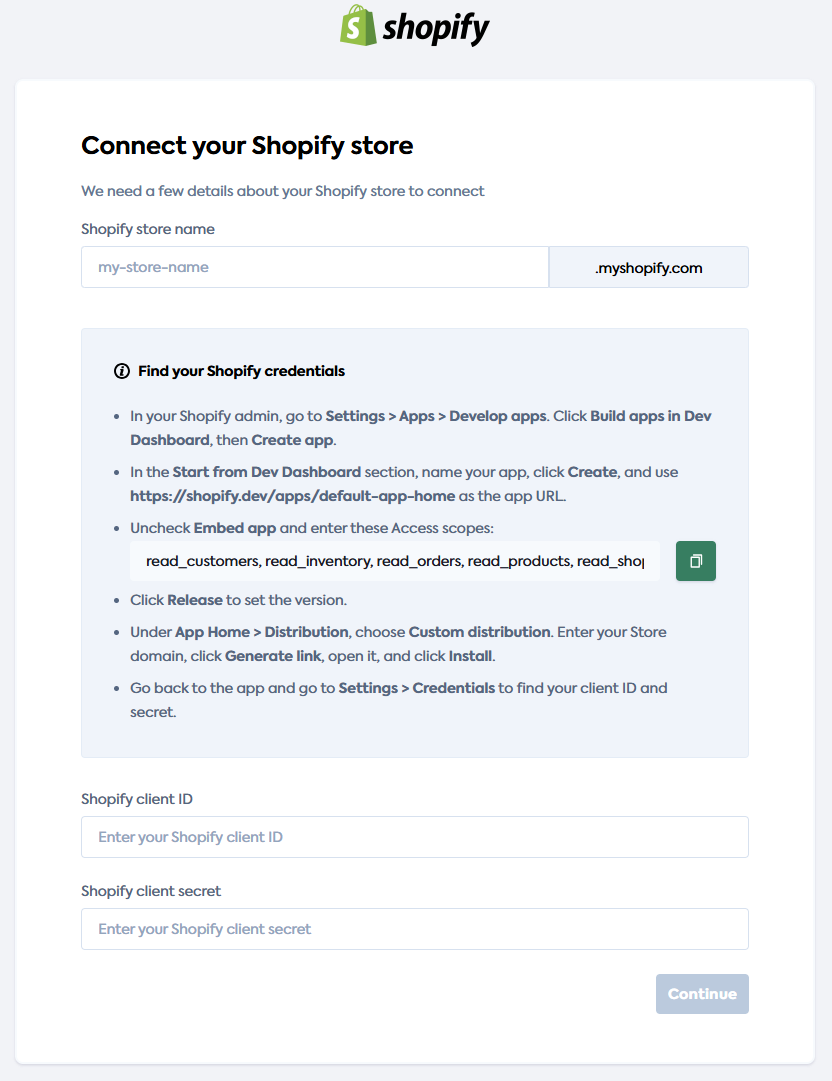
-
Client ID and client secret: Merchants now enter their Shopify client ID and Shopify client secret (from the app’s Settings > Credentials) instead of an Admin APIAPI A set of rules and protocols that allows different software applications to communicate with each other. Codat provides APIs for accessing financial data from accounting, banking, and commerce platforms. access token. The connectionConnection A link between a Codat company and a data source (like an accounting platform). Each connection represents authorized access to pull or push data from that platform. UI makes it clear that only the store name subdomain (the part before
.myshopify.com) is needed. -
Find your Shopify credentials: The LinkLink The authorization flow that allows end users to connect their accounting, banking, or commerce platforms to your application via Codat. UI includes an in-page Find your Shopify credentials section that walks merchants through creating and configuring a custom app, choosing custom distribution, installing the app, and retrieving credentials—without leaving the flow.
-
Step-by-step instructions: The guide now follows Shopify’s current path: Settings > Apps > Develop apps > Build apps in Dev Dashboard > Create app, then creating a version (including App URL
https://shopify.dev/apps/default-app-home, unchecking Embed app, and setting access scopes), App Home > Distribution > Custom distribution, and Settings > Credentials for client ID and secret. -
LinksLink The authorization flow that allows end users to connect their accounting, banking, or commerce platforms to your application via Codat. to Shopify docs: Merchants can open the Shopify docs for Custom apps (Create a custom app and Install a custom app) and Select a distribution method for more detail.
Who is this relevant for?
This update is relevant for clients whose merchants use the Shopify Custom apps connectionConnection A link between a Codat company and a data source (like an accounting platform). Each connection represents authorized access to pull or push data from that platform. method in Codat LinkLink The authorization flow that allows end users to connect their accounting, banking, or commerce platforms to your application via Codat.. The improved flow reduces confusion and support load by guiding merchants through the correct Shopify admin steps and credential fields.
How to get started?
The updated flow is already reflected in LinkLink The authorization flow that allows end users to connect their accounting, banking, or commerce platforms to your application via Codat.. For full setup and merchant instructions, see Set up Shopify using custom apps.