Credit model overview
Access a detailed data-driven assessment of a business's financial health and creditworthiness
Lending's premium Credit model feature provides an intuitive way to interpret, visualize, and analyze a borrower’s accounting and banking data. It offers a holistic view of financial performance to support credit decisions and other financial evaluations.
Credit Model report is a premium feature of the Lending product. Contact your Account Manager if you wish to enable it.
Features
The Credit model contains a variety of features that enhance the underwriting process:
-
Dashboard: an all-encompassing view of a borrower’s financial health
-
Credit score: a customizable credit score that aligns the model to the metrics most important to your analysis
-
Accounting score: an evaluation of the quality and completeness of a business’s bookkeeping
-
Financial summary: financial statements that are automatically spread with calculated metrics and ratio
-
Bank summary: bank transaction data that is converted into a cash-based profit and loss statement
-
Debt summary: a breakdown of existing debt with historical and projected repayment terms
-
Customer summary: terms, concentration, and punctuality of a borrower’s receivables
-
Repayment summary: terms, concentration, and punctuality of a borrower’s payables
Feature components
The Credit Model report can be based on accounting data sourcesData source An external platform (such as QuickBooks, Xero, or a bank) that Codat integrates with to pull or push financial data., banking data sourcesData source An external platform (such as QuickBooks, Xero, or a bank) that Codat integrates with to pull or push financial data., or both.
Supported integrations: accounting
Supported integrations: banking
Feature enrichments
The Credit model report provides the following insights into the financial health of a companyCompany In Codat, a company represents your customer's business entity. Companies can have multiple connections to different data sources.:
-
Key highlights: a detailed outline of the companyCompany In Codat, a company represents your customer's business entity. Companies can have multiple connections to different data sources.’s best performing and most material financial metrics
-
Key risks: a detailed outline of the companyCompany In Codat, a company represents your customer's business entity. Companies can have multiple connections to different data sources.’s worst performing and most material financial metrics
-
Proforma cash runway: a prediction of a cash runway that considers historical burn, upcoming capital injections, and future debt payments
-
Knockout rules: custom alerts for when certain financial metrics reach given thresholds
-
Accounting issues: an explanation of any poor bookkeeping practices
-
Closed books indicator: an estimation of the most recent accounting period officially closed by a business
-
Debt repayment schedule: implied terms of a companyCompany In Codat, a company represents your customer's business entity. Companies can have multiple connections to different data sources.’s credit cards and debt facilities, including payment, frequency, maturity, and balance
-
Accounts receivable aging: an automated aging schedule from unpaid customer invoices
-
Accounts payable aging: an automated aging schedule from unpaid supplier bills
-
Customer summary: a full overview of customer repayment behavior, including percentage of on-time payments, breakdown of repayment terms, and customer concentration
-
Repayment summary: a full overview of supplier repayment behavior, including percentage of on-time payments, breakdown of repayment terms, and supplier concentration
Supported outputs
You can generate and retrieve the data read and enriched by this feature in an Excel format using an APIAPI A set of rules and protocols that allows different software applications to communicate with each other. Codat provides APIs for accessing financial data from accounting, banking, and commerce platforms. call or in the Codat Portal.
Get report via APIAPI A set of rules and protocols that allows different software applications to communicate with each other. Codat provides APIs for accessing financial data from accounting, banking, and commerce platforms.
Use the Generate report endpoint to asynchronously generate the report. Set the reportType parameter to creditModel. Initiating the report will trigger a new data syncSync The process of fetching the latest data from a connected data source. Syncs can be triggered manually or run automatically on a schedule..
Next, call the Download credit model Excel endpoint to retrieve the resulting report.
You can also view individual Credit Model metrics using the Get financial summary insights endpoint.
The Credit Model feature must be enabled before you can generate the Credit Model report and its metrics via APIAPI A set of rules and protocols that allows different software applications to communicate with each other. Codat provides APIs for accessing financial data from accounting, banking, and commerce platforms.. Speak to your Account Manager to enable it.
Get report via Portal
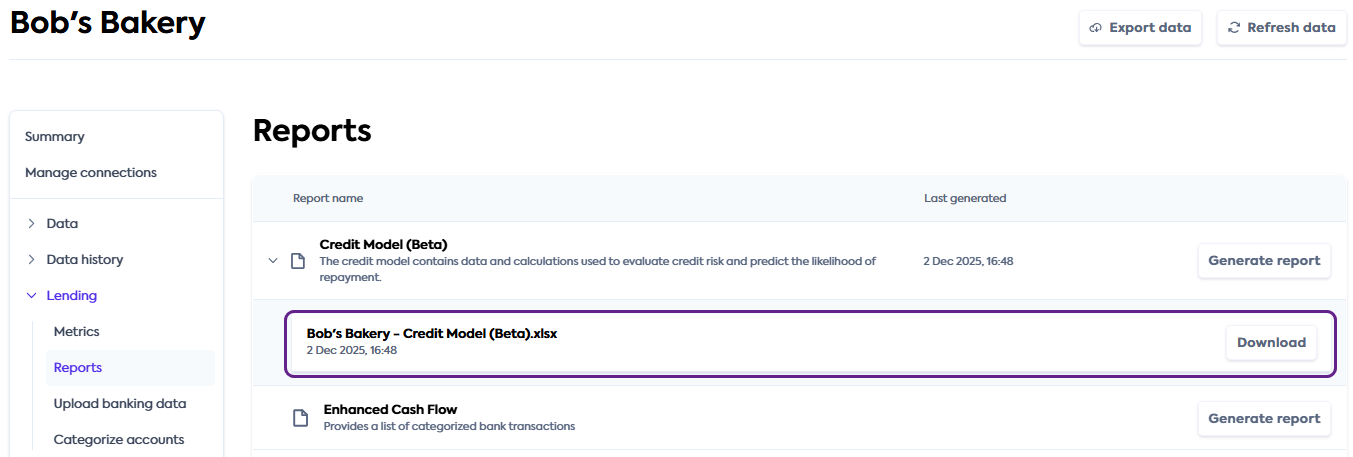
In the Codat Portal, navigate to Companies and select the companyCompany In Codat, a company represents your customer's business entity. Companies can have multiple connections to different data sources. you want to analyze. In the side menu, click Lending > Reports.
In the list of reports, find Credit Model and click Generate report. Once the report is ready to download, it will appear underneath the report name. Click Download to save the report to your machine.
The Credit Model feature must be enabled before you can access the Credit Model report in the Portal. Speak to your Account Manager to enable it.
Get started
Once you have the Lending solution enabled, contact your Account Manager or our support team to enable the Credit Model report. As a premium feature, it will be billed in addition to your use of the Lending solution.
Next, configure your instance to work with the Credit Model feature.
Configure data sourcesData source An external platform (such as QuickBooks, Xero, or a bank) that Codat integrates with to pull or push financial data.
Follow the respective guides to set up and enable accounting integrations that will serve as a data sourceData source An external platform (such as QuickBooks, Xero, or a bank) that Codat integrates with to pull or push financial data. for the feature:
Accounting data sourcesData source An external platform (such as QuickBooks, Xero, or a bank) that Codat integrates with to pull or push financial data.










Banking data sourcesData source An external platform (such as QuickBooks, Xero, or a bank) that Codat integrates with to pull or push financial data.


Enable data types
See how to enable data types and ensure the following data types have been switched on:
| Accounting | Banking |
|---|---|
CompanyCompany In Codat, a company represents your customer's business entity. Companies can have multiple connections to different data sources. company | Banking transactions banking-transactions |
Profit and loss profitAndLoss | Banking accounts banking-accounts |
Balance sheet balanceSheet | |
Bills bills | |
Bill payments billPayments | |
Suppliers suppliers | |
Customers customers | |
Invoices invoices | |
Payments payments | |
Credit notes creditNotes |
Configure webhooksWebhook An automated notification sent from Codat to your application when specific events occur, such as when data syncs complete or connections change status.
We recommend you subscribe to the following webhooks if you are using an APIAPI A set of rules and protocols that allows different software applications to communicate with each other. Codat provides APIs for accessing financial data from accounting, banking, and commerce platforms. solution:
-
reports.creditModel.generate.successfulThis webhookWebhook An automated notification sent from Codat to your application when specific events occur, such as when data syncs complete or connections change status. will notify you once the report successfully generates.
-
reports.creditModel.generate.unsuccessfulThis webhookWebhook An automated notification sent from Codat to your application when specific events occur, such as when data syncs complete or connections change status. will notify you if the report generation fails.